



What your people know. Put to work.
Humantic is Multiplied’s intelligence service for frontline operations. It connects the communication already flowing through your team, builds a shared understanding of what is happening, and puts that intelligence to work.
It starts with something someone noticed.
Humantic connects the details that normally stay scattered across conversations. Each step carries the original context forward.
Signal
A call, photo, message, or connected system event enters the operation’s record.
Activity
Humantic structures the essentials: what happened, who observed it, where, and when.
Intel
Related observations become a connected record. Ambiguities are surfaced for clarification.
Work
The record feeds a report, a handoff, a task, or an answer—with review where it is needed.
Knowledge goes in. Useful work comes back.
The channels people already use.
Bring together the calls, messages, photos, and updates your team already shares. Connected systems add context from access events, incident logs, and other operational records.
- Radio / PTT
- Microsoft Teams
- SMS
- Humantic app
- Connected systems
The form the work actually needs.
Put that context to work in the form your operation needs: a report in the customer’s format, a handoff for the next shift, or guidance back to the field. These are just some of the ways Humantic helps move the work forward.
- Shift reports
- Incident reports
- Daily reports
- Handoffs
- Follow-up tasks
- Field guidance
One workspace. Five connected rooms.
Owners, supervisors, and managers use the desktop workspace to review the work and handle what needs their attention. The frontline stays connected through familiar channels.
Know what needs you.
See what is happening across the operation, follow the intelligence being generated, and handle the questions and decisions that need your attention.
Connect your operation.
Explore the people, work channels, and systems feeding your intelligence domain. Follow incoming signals back to their original source.
Put intelligence to work.
Open the Intel Apps running your operational workflows. Follow their progress, review their outputs, and work through the details.
Set the boundaries.
Manage the people, connections, permissions, and governance that shape your operation’s workspace.
Build on what your company knows.
Explore the structured intelligence your company accumulates. Keep the records and source context useful beyond the current shift.
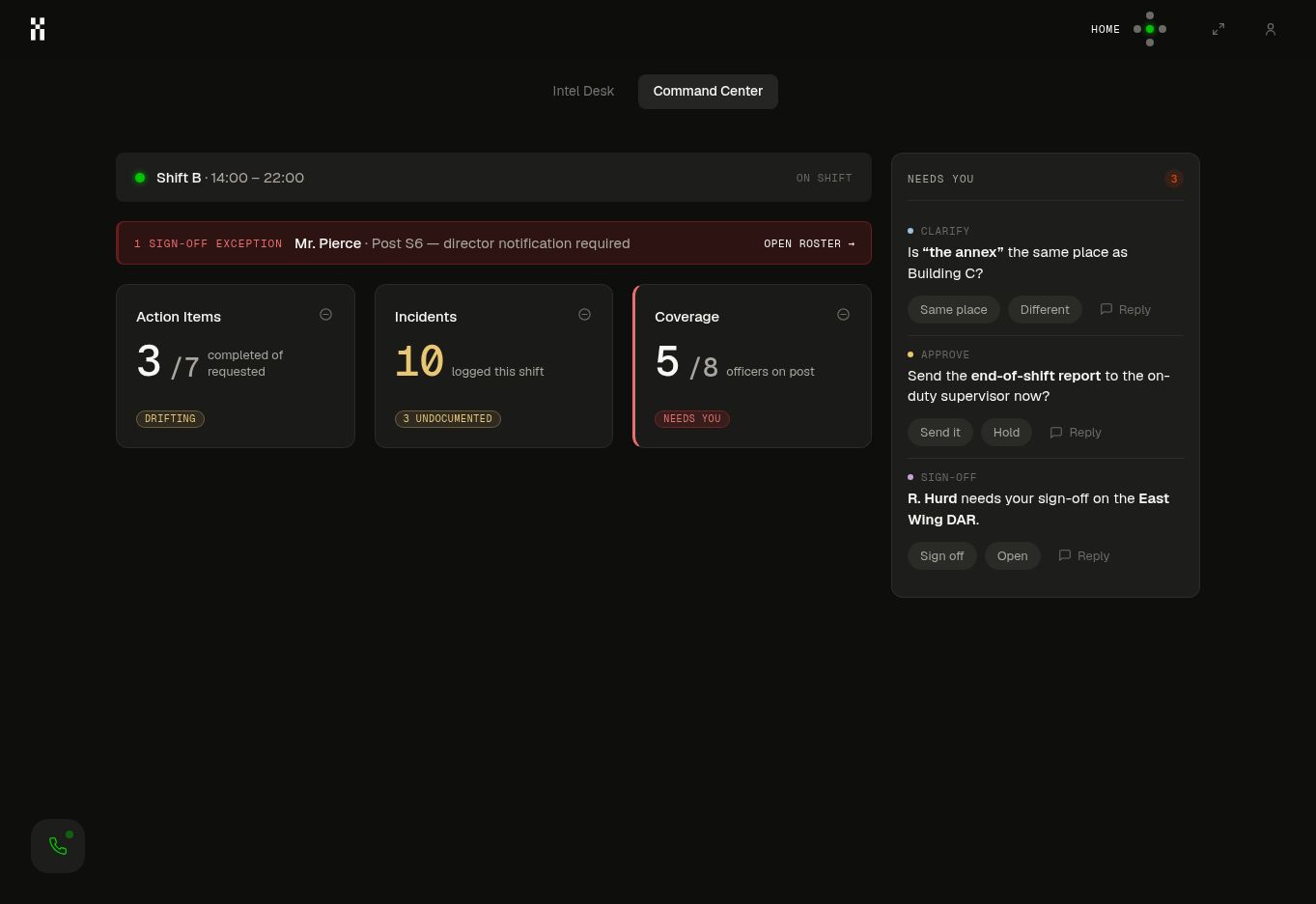
Clear about what it knows. Clear about what it needs.
Humantic shows where the facts came from, asks when meaning is uncertain, and brings consequential decisions to a person.
Clarify the meaning
When a location, sequence, or observation is ambiguous, Humantic asks the person who can resolve it before treating the interpretation as confirmed.
Review the work
Reports and summaries arrive with the original observations attached. The responsible person can check, correct, and approve the draft.
Confirm responsibility
Sign-off confirms what remains open and who takes it forward. An expert can be brought into the loop when the answer depends on experience.
Today’s work becomes tomorrow’s context.
The immediate return is practical: less reconstruction, better handoffs, and work ready to review. Your company retains a growing body of operational intelligence, with the source context that makes it useful to the next person.
Your language
The names, locations, equipment, and shorthand that make sense inside your operation.
Your standards
The formats, review points, and approved ways of working that define a good result.
Your experience
The observations and expert explanations that help the next person understand what matters.
See what Humantic could take off your desk.
Start with one recurring responsibility. We’ll work through the inputs, the output, and the decisions your team needs to keep.